To a GPU, Qwen3.8-27B isn’t a model. It’s a loop of 902 kernels.
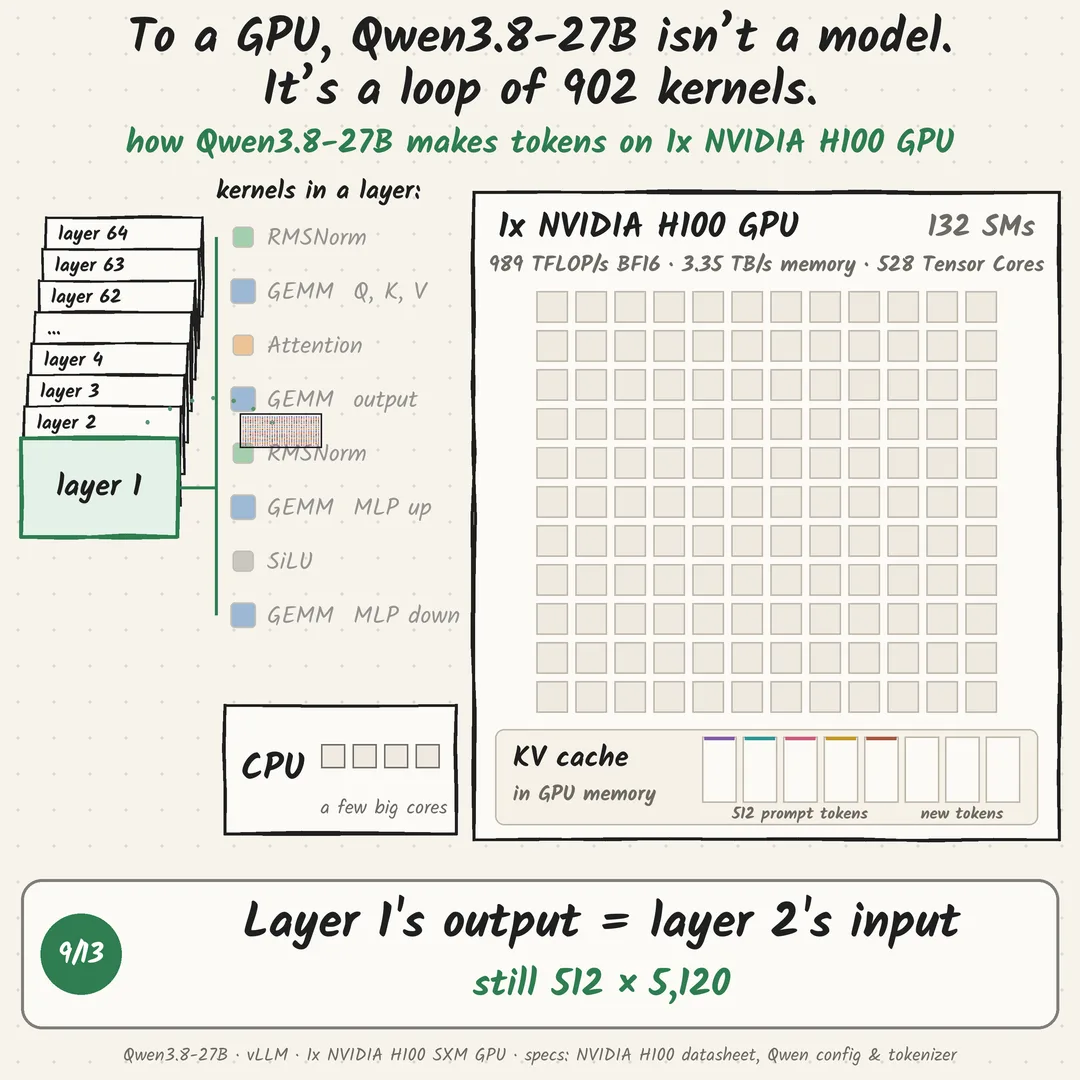
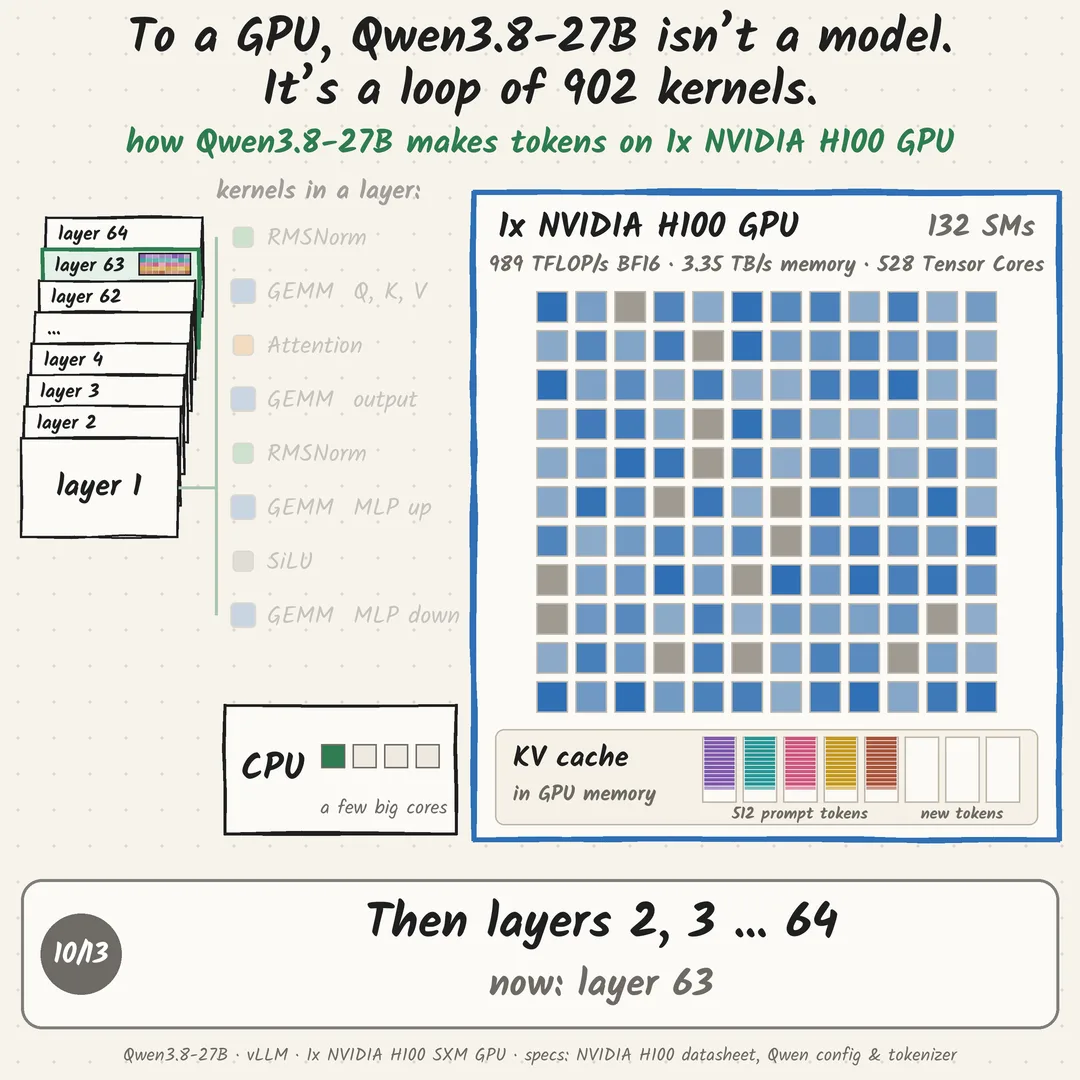
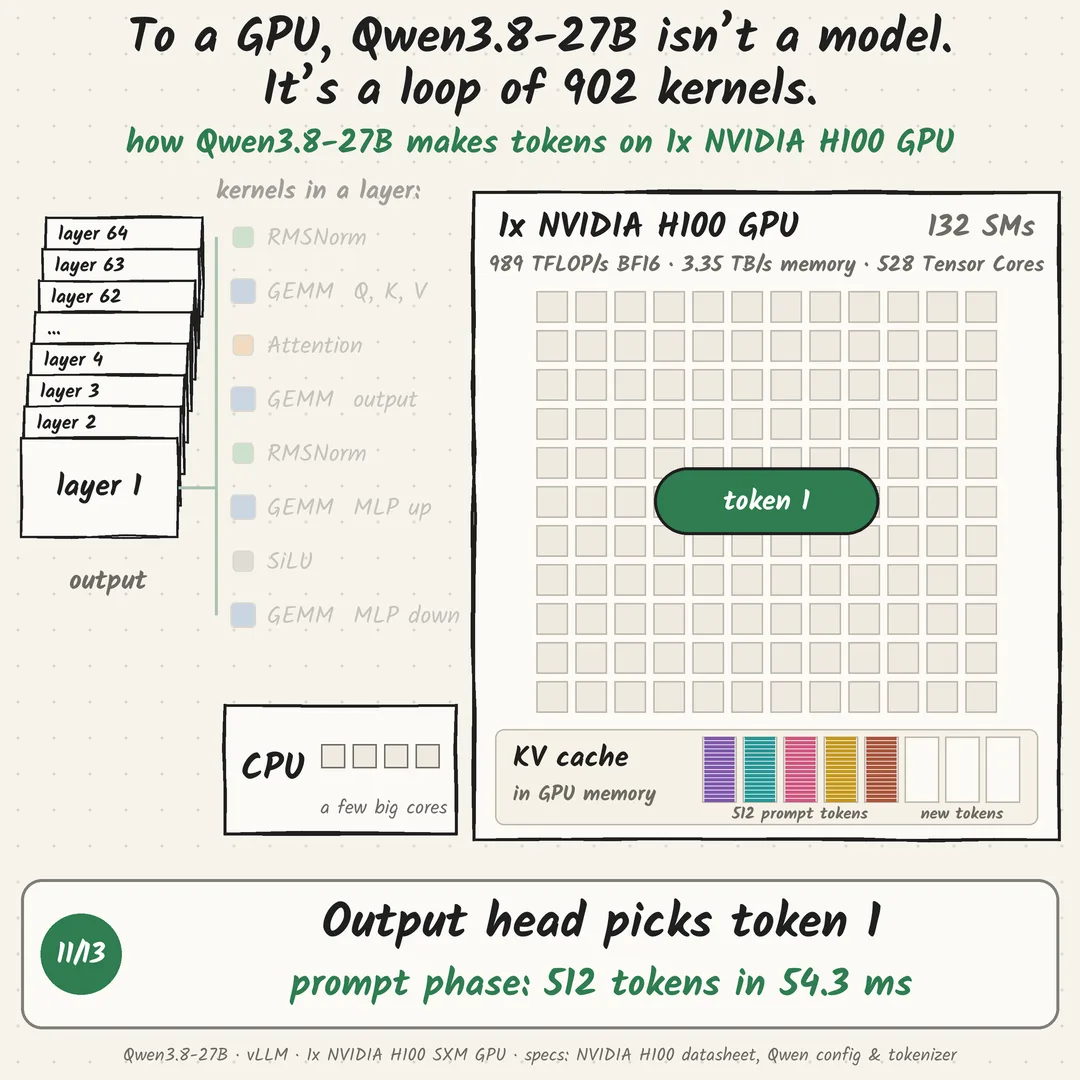
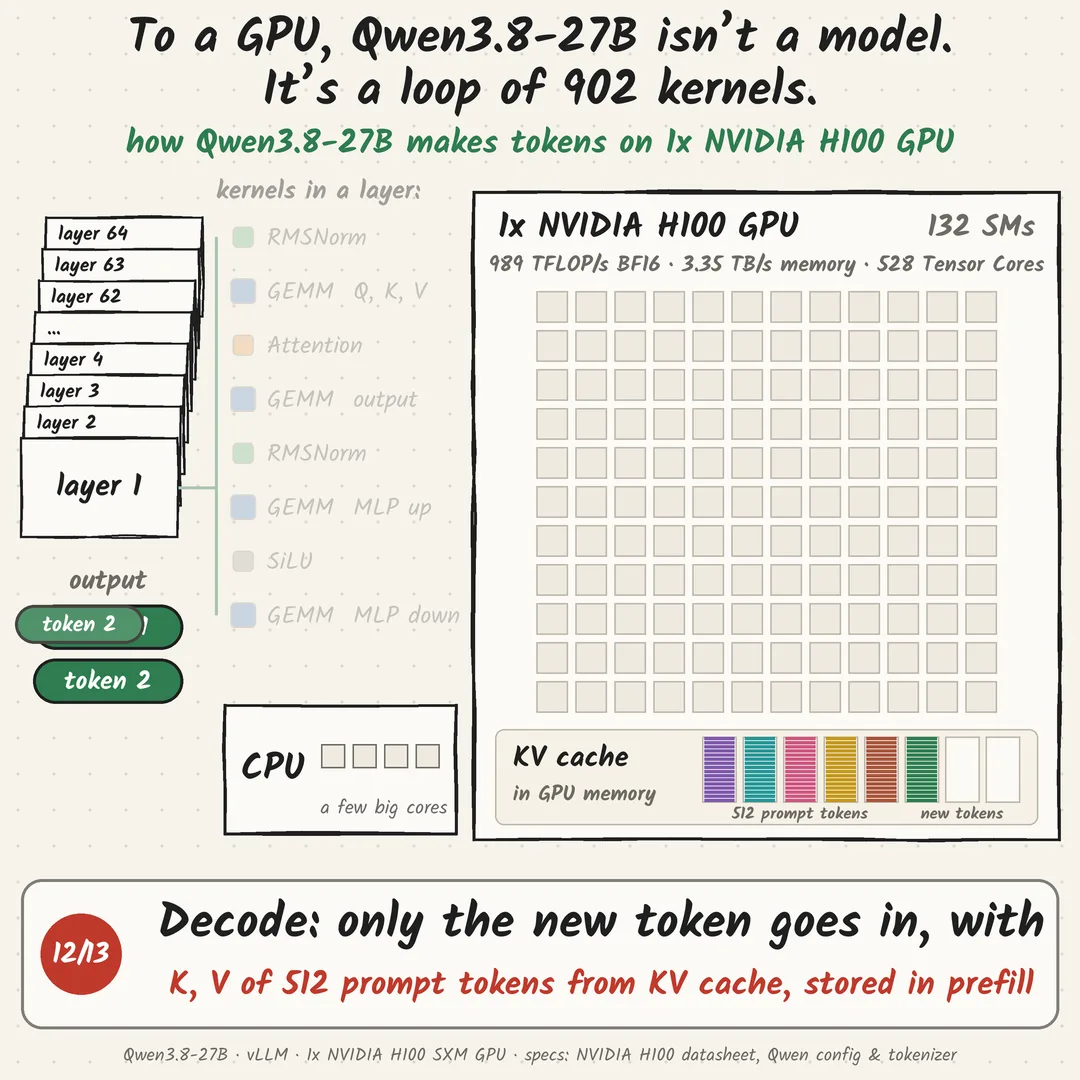
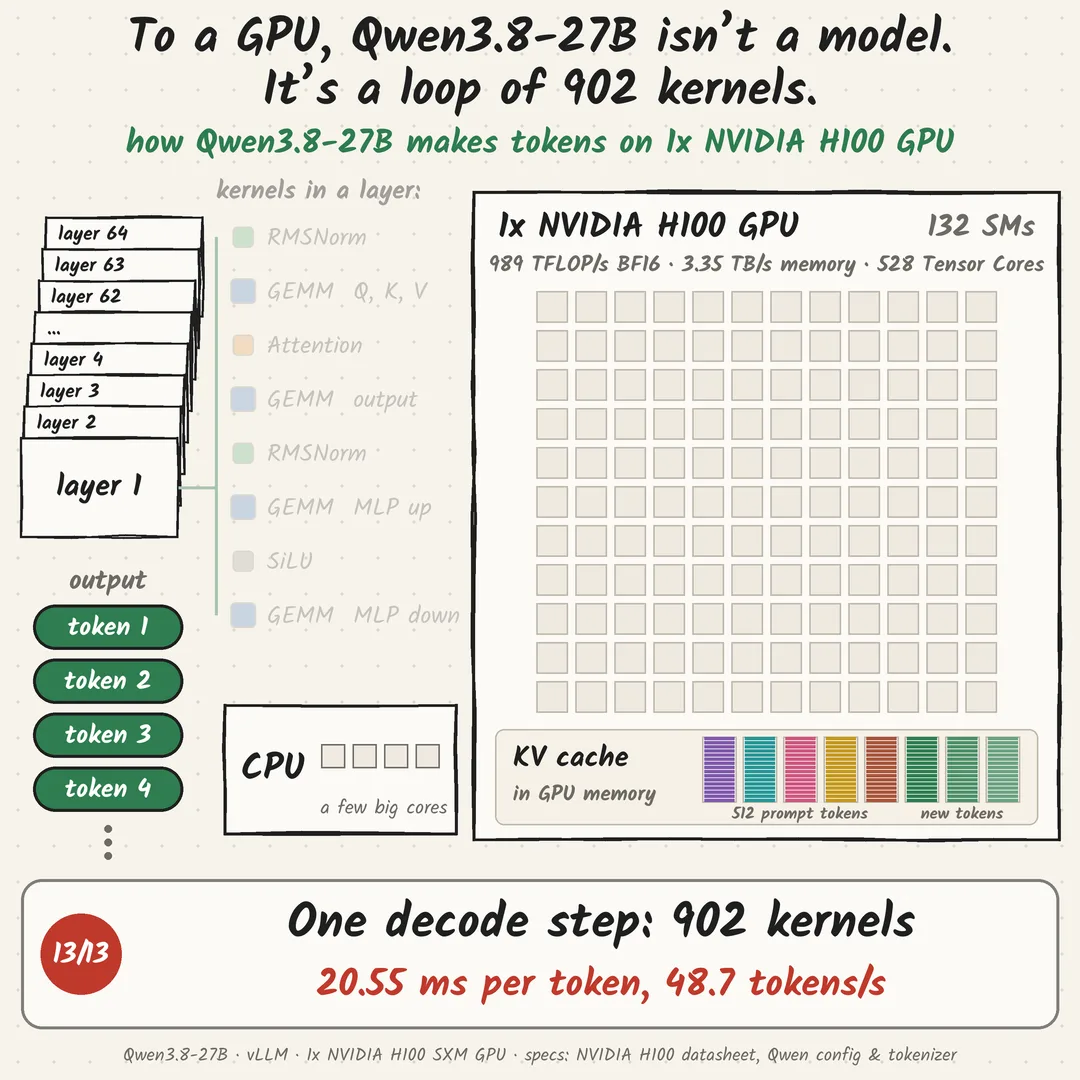
How a prompt becomes an answer:
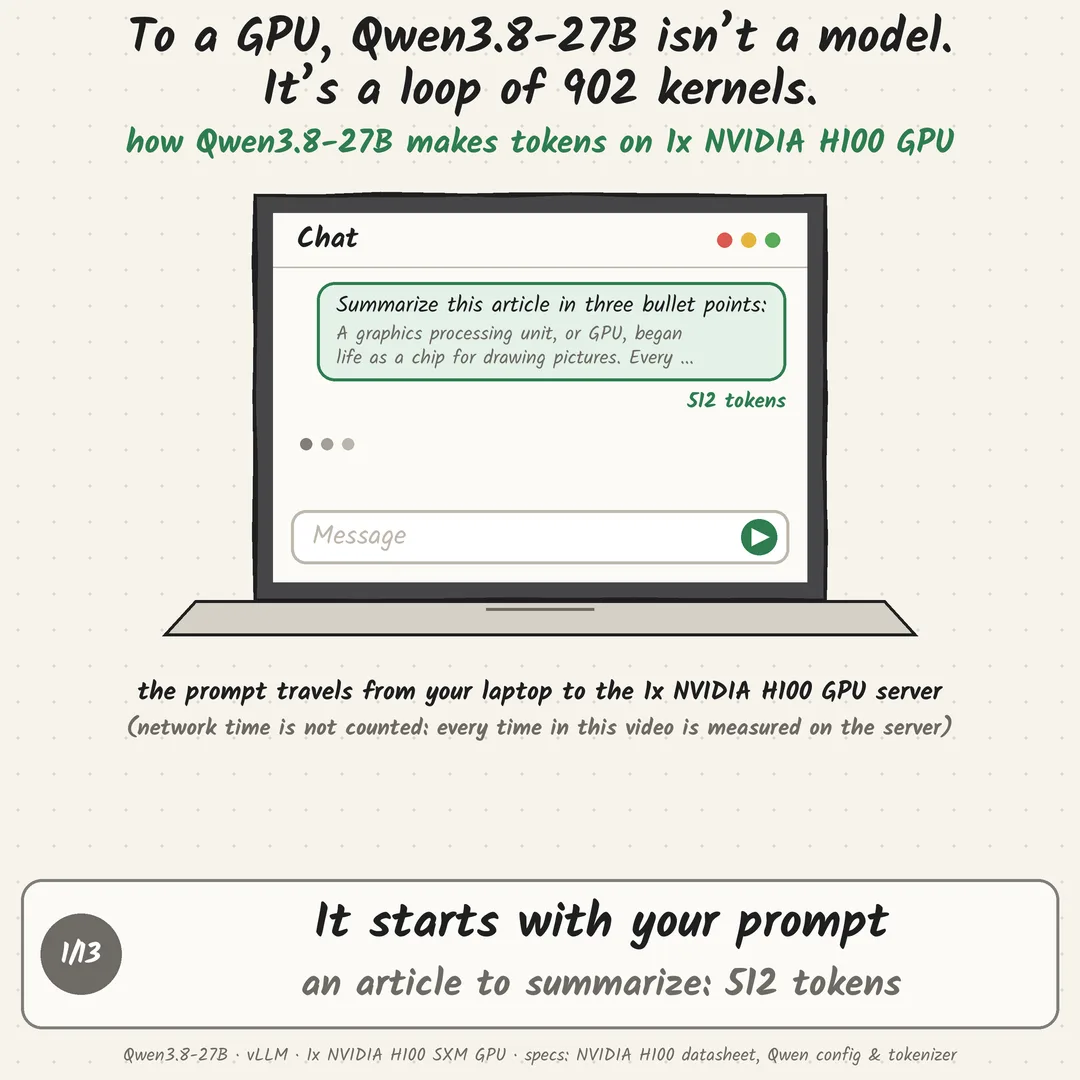
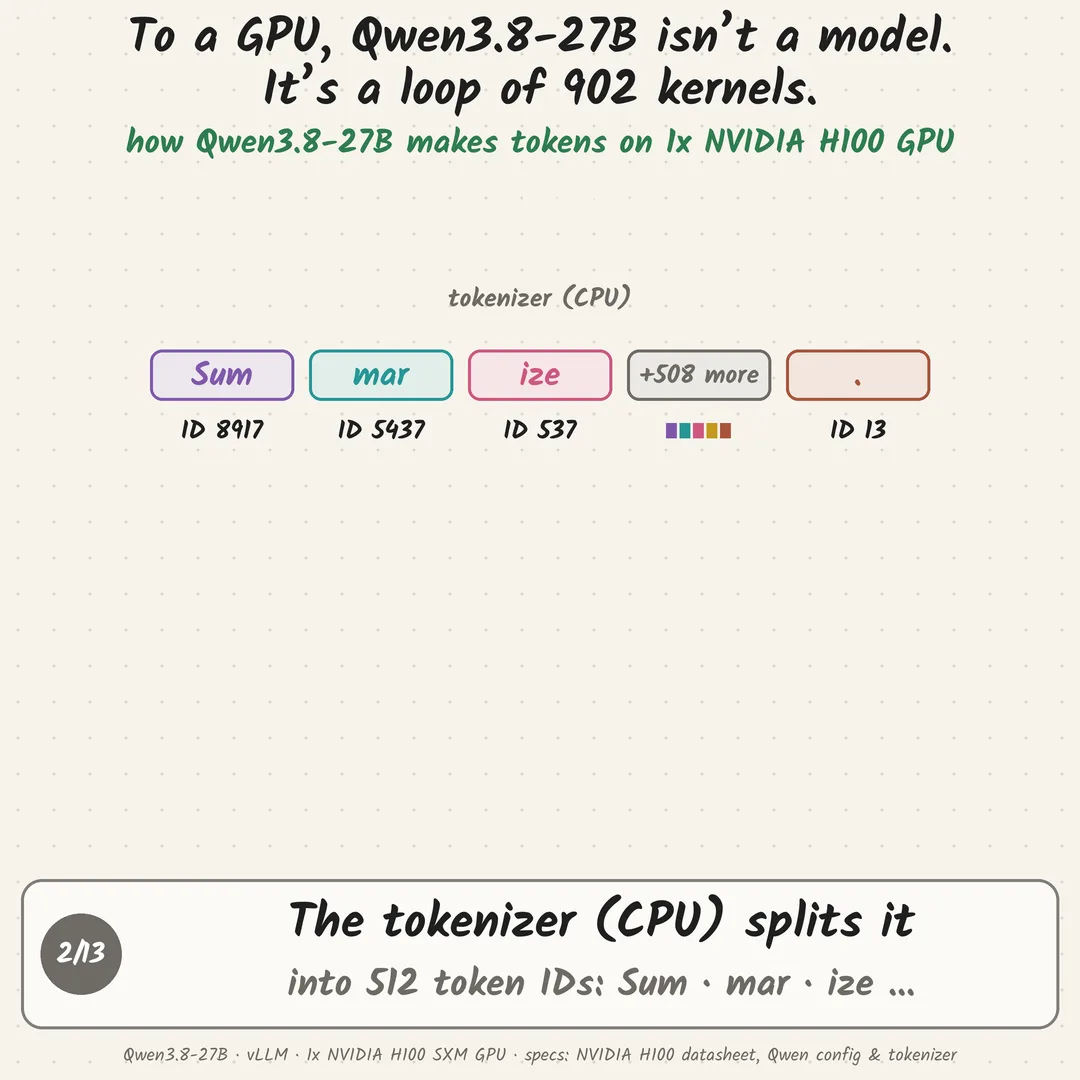
- Tokenizer (on the CPU): my prompt, “Summarize this article…” plus the article, becomes 512 token IDs
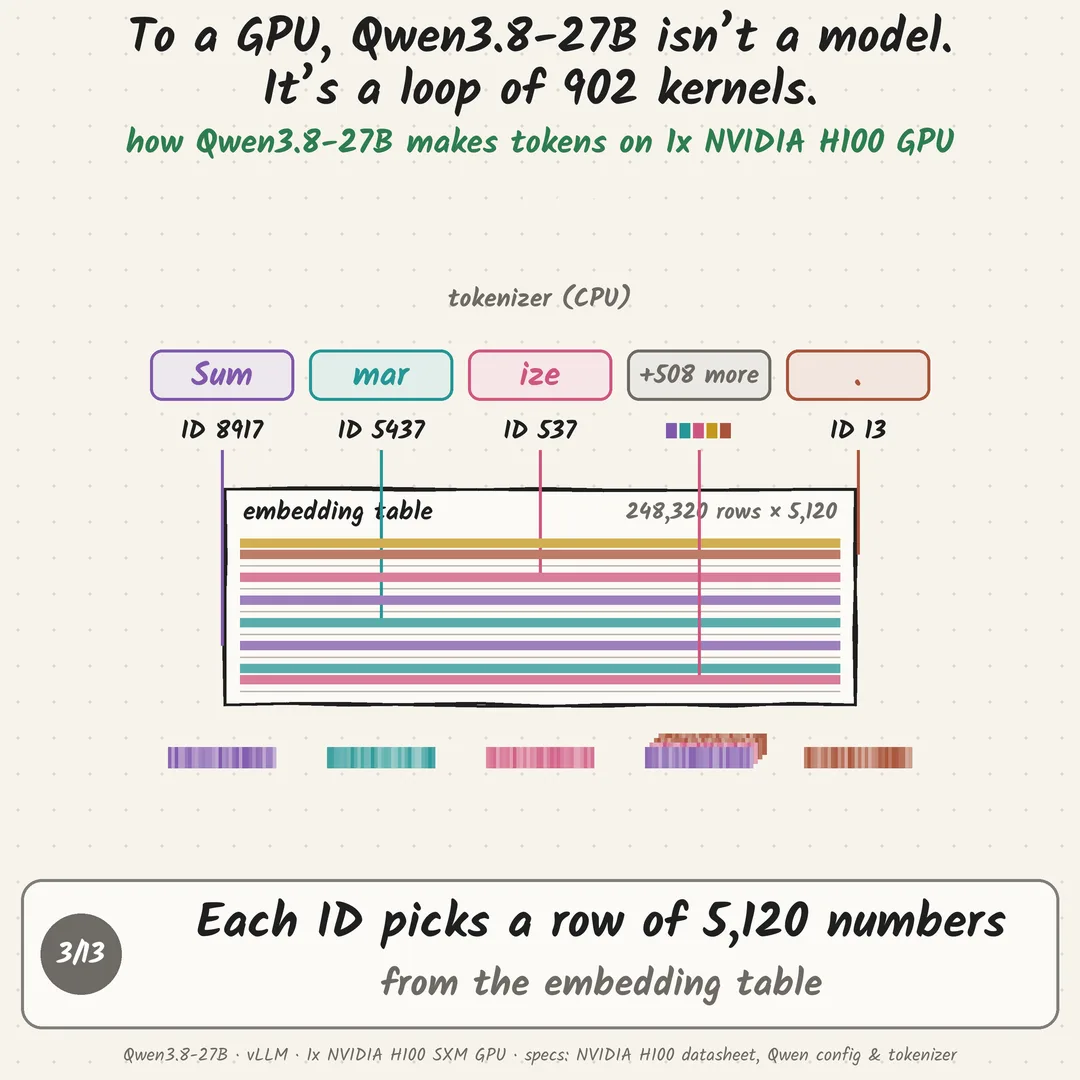
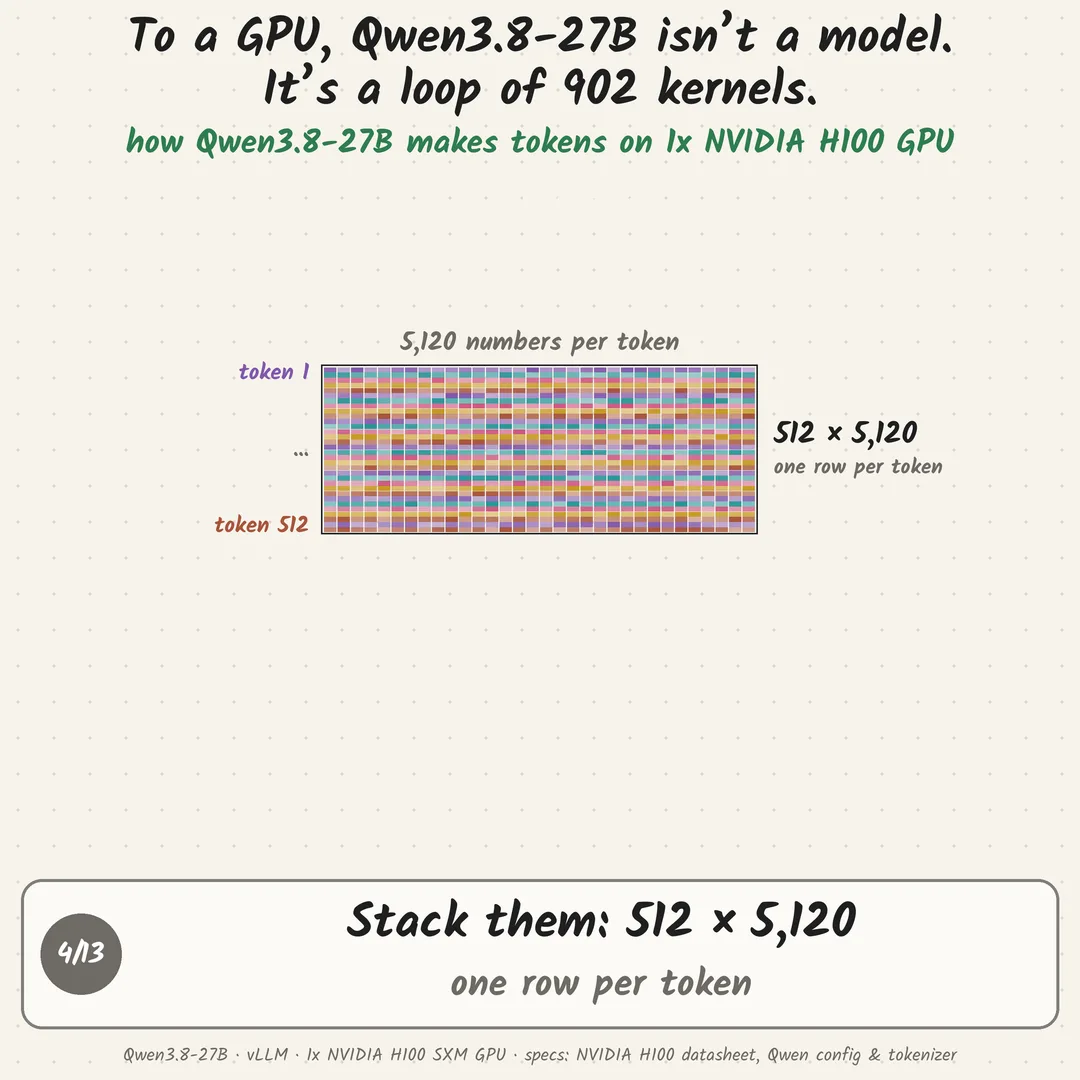
- Embedding: each ID looks up a row of 5,120 numbers, giving a 512 × 5,120 matrix
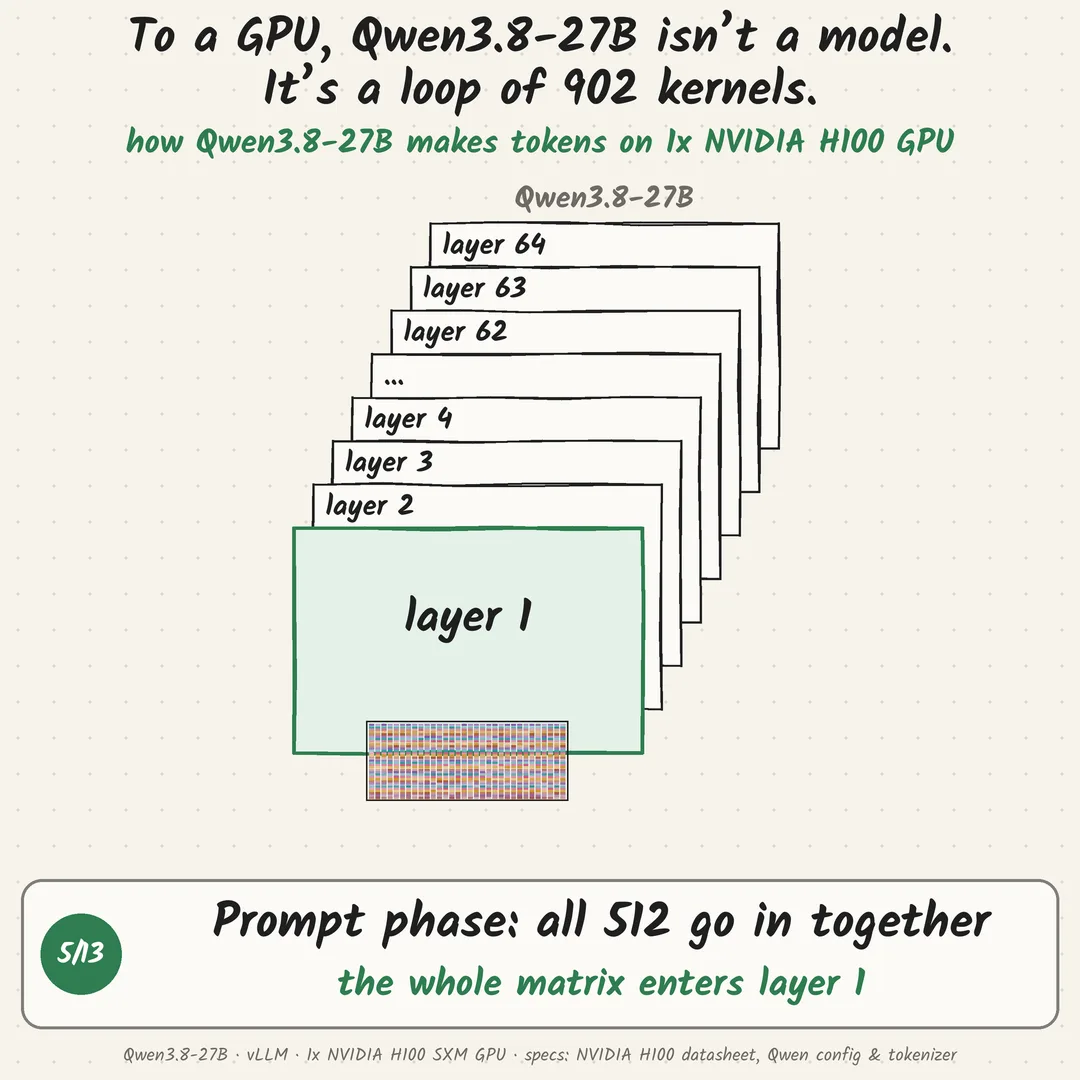
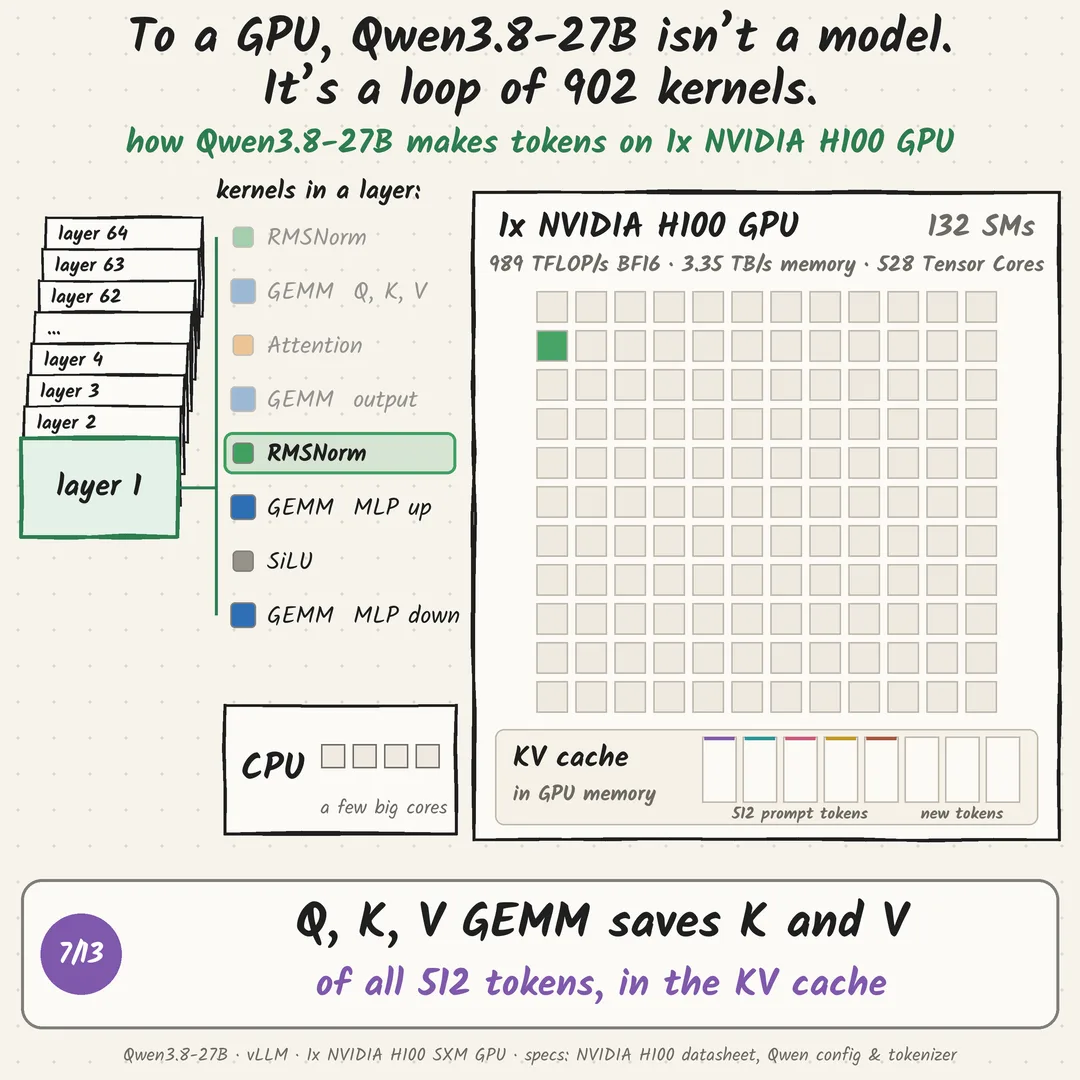
- Prompt phase: the whole matrix of 512 × 5,120 goes through the 64 layers together (54.3 ms on 1x NVIDIA H100 GPU), and each layer saves the K and V of all 512 tokens in the KV cache (GPU memory)
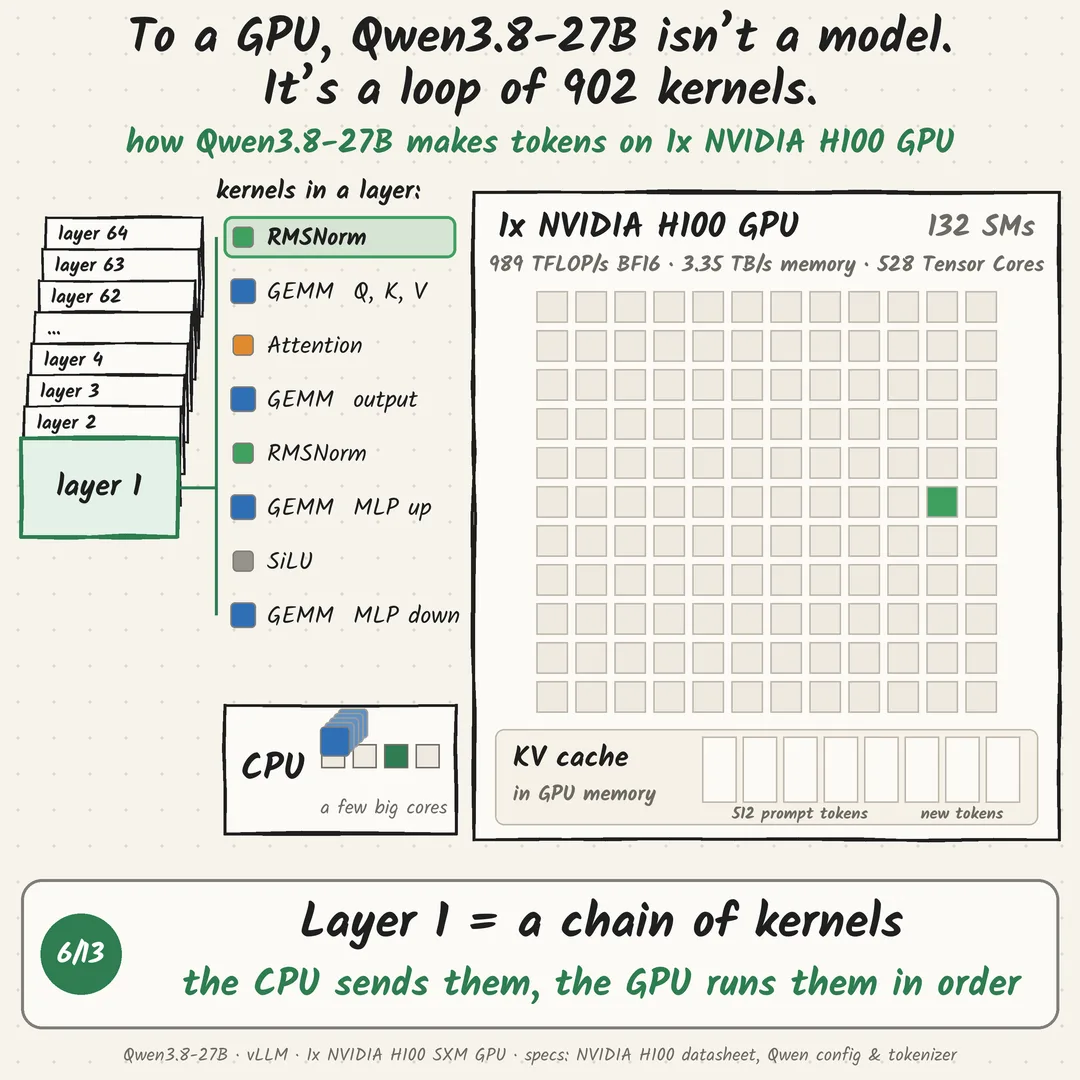
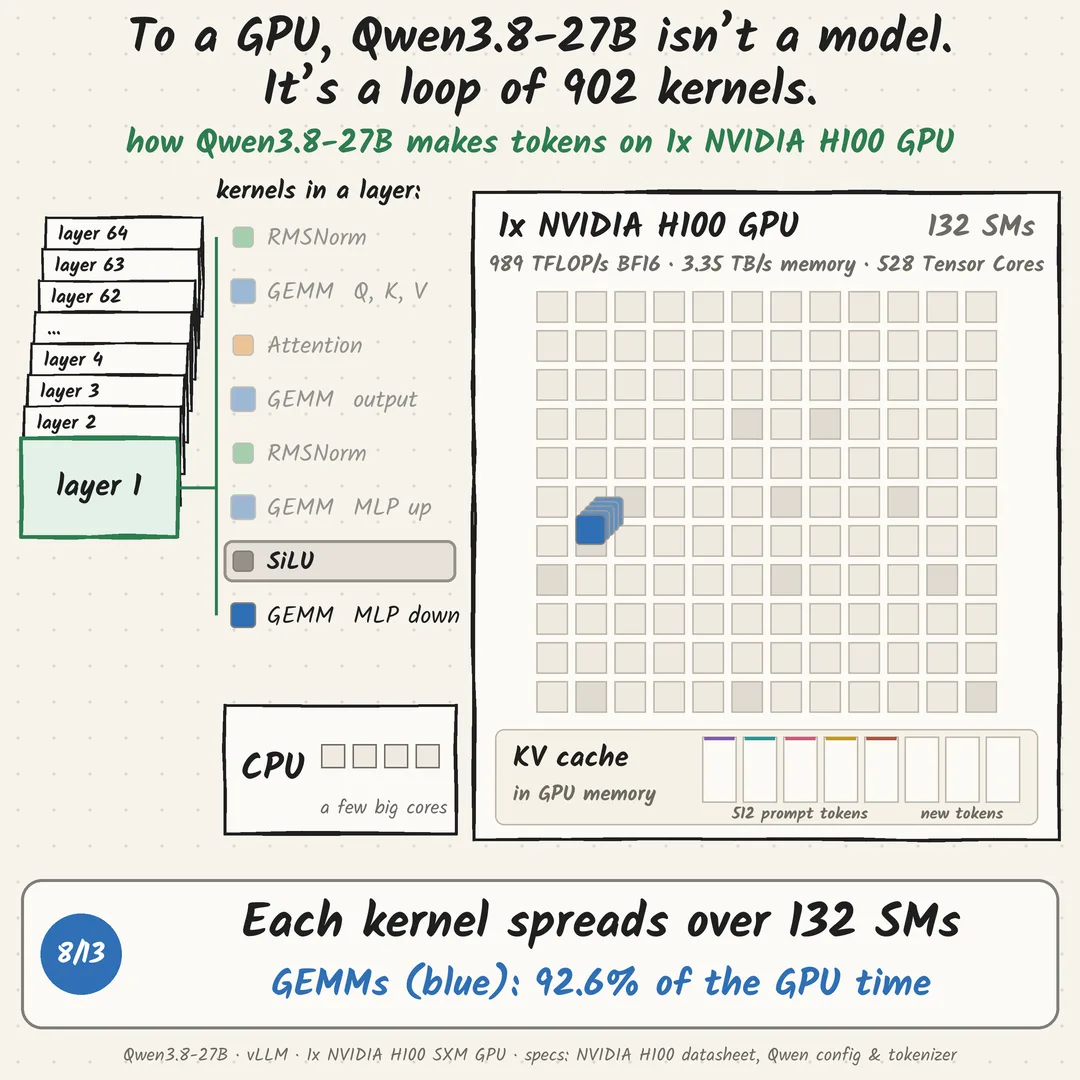
- Each layer is a handful of kernels: RMSNorm, GEMMs, attention, SiLU. The CPU sends them to the GPU, which runs them in order and spreads each one over its SMs
- After layer 64, the output head picks token 1
- Decode phase: the KV cache already holds the K and V of all 512 prompt tokens, so only token 1 goes back in. 64 layers again, out comes token 2. Then token 3…
A 500-token answer = 1 prompt pass + 499 decode passes.
(All times are measured on the GPU server. The network time from your laptop to the server isn’t included.)
One decode step on 1x NVIDIA H100 GPU (batch 1, vLLM default settings):
- 902 kernels in 20.55 ms, 48.7 tokens/s
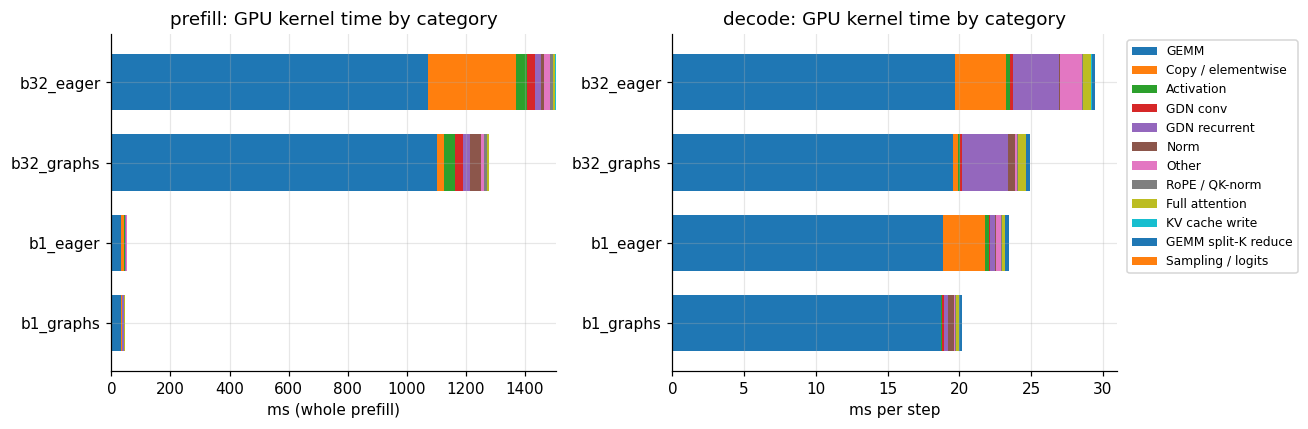
- 305 are GEMMs (matrix multiplies), 92.6% of the GPU time
- the other 597 are small: RMSNorm, attention, SiLU, RoPE, KV-cache writes
Without CUDA graphs (eager mode), the same step is 2,464 kernels, because torch.compile’s fused kernels are off.
The hardware (NVIDIA spec, 1x NVIDIA H100 SXM GPU): 132 SMs · 528 Tensor Cores · 989 TFLOP/s BF16 · 3.35 TB/s memory.
An LLM is mostly matrix multiplies. A GPU is a machine built to run them in parallel.
Next post: prompt phase vs decode phase. Same kernels, very different use of those 989 TFLOP/s.
Which kernel would you guess is the slowest?
Go deeper
The 902 kernels, grouped by what they do. This is the chart behind “92.6% GEMMs”, from the same run’s Nsight Systems traces.

Measured on
- GPU
- 1x NVIDIA H100 SXM 80GB (GCP a3-highgpu-1g)
- Model
- Qwen3.8-27B, BF16
- Engine
- vLLM 0.31, default settings
- Workload
- Batch 1, 512-token prompt
Sources & methodology
Every number in this episode comes out of this notebook, together with the code that produces it. No GPU? It reads the stored 1x NVIDIA H100 GPU results and runs on any laptop or in Colab. With an NVIDIA GPU it measures them on yours.
Post 1: a loop of 902 kernels
Reproduces every number in Post 1 of the LinkedIn series LLM inference through the lens of a GPU: what Qwen3.8-27B looks like to 1x NVIDIA H100 GPU. The notebook loads the model's config (64 layers), turns the prompt into 512 tokens, times the prompt phase and one decode step, and then opens the Nsight Systems trace to count the kernels in one decode step (902) and how much of the GPU time each kind of kernel takes (GEMMs: 92.6%). Every number is computed by the code below, from the raw trace.
Input: one run folder made by setup.ipynb (benchmarks + Nsight Systems traces). By default the
notebook uses the run behind the post, runs/2026-10-09_qwen3.8-27b_bf16_initial/ (1x NVIDIA H100 SXM GPU,
vLLM 0.31). Ran setup.ipynb on your own GPU? Set RUN_ID below to your run folder and every number is recomputed
from your data. No GPU and no Nsight install needed to run this notebook: it reads the traces' SQLite exports.
Google Colab: the first code cell fetches the repo, then it runs like on a laptop.
# Google Colab only: fetch the repo at this post's tag so runs/ is there; does nothing on a laptop or in VS Code.
# Colab already has pandas, numpy, matplotlib, huggingface_hub and tokenizers.
import os, sys, subprocess
if "google.colab" in sys.modules:
    REPO, TAG = "/content/Sillybench", "post-01"
    if not os.path.isdir(REPO):
        subprocess.run(["git", "-c", "advice.detachedHead=false", "clone", "-q", "--depth", "1", "--branch", TAG,
                        "https://github.com/tgarg01/Sillybench.git", REPO], check=True)
os.chdir(f"{REPO}/notebooks")import os, json, re, sqlite3
from pathlib import Path
os.environ.setdefault("HF_HUB_DISABLE_PROGRESS_BARS", "1") # quiet config/tokenizer downloads
os.environ.setdefault("HF_HUB_VERBOSITY", "error")
import numpy as np
import pandas as pd
import matplotlib.pyplot as plt
# repo root = the folder that contains runs/
ROOT = Path.cwd().resolve()
while not (ROOT / "runs").is_dir() and ROOT != ROOT.parent:
ROOT = ROOT.parent
RUN_ID = "2026-10-09_qwen3.8-27b_bf16_initial" # the run behind the post; or your own run folder from setup.ipynb
RUN = ROOT / "runs" / RUN_ID
CFG = json.loads((RUN / "config.json").read_text()) # the exact vLLM settings of that run
MODEL = CFG["vllm"]["model"]
INPUT_LEN = CFG["workload"]["input_len"] # 512-token prompt
OUT_TOKENS = CFG["nsys"]["out_tokens"] # forward passes inside the traced decode range
pd.set_option("display.width", 160)
GPU = CFG.get("observed", {}).get("env", {}).get("gpu", "see the run's env/ folder")
print("run:", RUN.name, "| model:", MODEL, "| GPU:", GPU)run: 2026-10-09_qwen3.8-27b_bf16_initial | model: Qwen/Qwen3.8-27B | GPU: NVIDIA H100 80GB HBM3
1. Get the model: 64 layers
The model's config.json describes its shape. The notebook downloads it from Hugging Face (a few KB, not the
weights) and falls back to the copy stored with the run when offline.
cfg_path = RUN / "analysis" / "model_config.json"      # stored copy of the model's config.json
try:
    from huggingface_hub import hf_hub_download
    cfg_path = Path(hf_hub_download(MODEL, "config.json"))
    print("config.json downloaded from Hugging Face:", MODEL)
except Exception as e:
    print(f"using the stored config.json ({type(e).__name__})")

model_cfg = json.loads(cfg_path.read_text())
tc = model_cfg.get("text_config", model_cfg)
LAYERS, HIDDEN, VOCAB = tc["num_hidden_layers"], tc["hidden_size"], tc["vocab_size"]
print(f"layers: {LAYERS}  |  hidden size: {HIDDEN:,} numbers per token  |  vocabulary: {VOCAB:,} tokens")

kinds = pd.Series(tc["layer_types"])
print(kinds.value_counts().rename("layers").to_string())
print("\nlayer map (F = full attention, . = linear attention):")
row = "".join("F" if t == "full_attention" else "." for t in kinds)
for i in range(0, LAYERS, 16):
    print(f"  layers {i + 1:>2}-{i + 16:<2} {row[i:i + 16]}")
config.json downloaded from Hugging Face: Qwen/Qwen3.8-27B layers: 64 | hidden size: 5,120 numbers per token | vocabulary: 248,320 tokens linear_attention 48 full_attention 16 layer map (F = full attention, . = linear attention): layers 1-16 ...F...F...F...F layers 17-32 ...F...F...F...F layers 33-48 ...F...F...F...F layers 49-64 ...F...F...F...F
2. The prompt: 512 tokens, then a 512 × 5,120 matrix
The post's prompt ("Summarize this article in three bullet points:" + a short article about GPUs) was written to be
exactly 512 tokens with the Qwen3.8-27B tokenizer. The cell below downloads the tokenizer (tokenizer.json, not the
weights) and tokenizes it. (The benchmark itself fed 512 random token IDs; the time doesn't depend on which tokens
they are.)
ARTICLE = """Summarize this article in three bullet points:

A graphics processing unit, or GPU, began life as a chip for drawing pictures. Every frame of a video game is made of millions of pixels, and each pixel needs the same small calculation: where is the light coming from, what colour is the surface, how far away is it. A CPU handles work like this one piece at a time, with a few very fast cores. A GPU takes the opposite approach. It has thousands of simpler cores grouped into streaming multiprocessors, and it gives every pixel its own thread, so millions of them run side by side.

For many years this was only useful for graphics. That changed in 2007, when NVIDIA released CUDA, a way to write ordinary programs for the GPU. Scientists started using GPUs for weather models, protein folding and physics simulations, because all of these problems can be split into many identical pieces of work. The real turning point came in 2012, when a neural network called AlexNet, trained on two gaming GPUs, won the ImageNet competition by a wide margin. Neural networks are mostly matrix multiplications, and a matrix multiplication is exactly the kind of work a GPU is built for: the same multiply and add, repeated billions of times on different numbers.

Since then GPUs have been redesigned around this workload. Modern data-centre GPUs such as the H100 contain Tensor Cores, small units that multiply whole blocks of numbers in a single step, and they sit next to very fast memory, because a large model has to read billions of weights for every piece of text it produces. The H100 has 132 streaming multiprocessors, 80 GB of high-bandwidth memory and can move more than three terabytes of data per second. Even so, memory speed is often the real limit: when a language model writes an answer one word at a time, the GPU spends most of its time waiting for weights to arrive rather than doing arithmetic.

Large language models such as Qwen, Llama and GPT are now trained on thousands of GPUs working together, connected by high-speed links so they can share results. Serving these models to millions of users is just as demanding. Engineers batch requests, keep a KV cache and write custom kernels to keep every part of the GPU busy. The design of the chip, the memory system and the software that schedules the work all decide how fast an answer appears on your screen and how much it costs to produce."""

from huggingface_hub import hf_hub_download
from tokenizers import Tokenizer
tok_file = hf_hub_download(MODEL, "tokenizer.json")
ids = Tokenizer.from_file(tok_file).encode(ARTICLE, add_special_tokens=False).ids
vocab = {v: k for k, v in json.loads(Path(tok_file).read_text())["model"]["vocab"].items()}
show = lambda i: f"{i} = {vocab.get(i, '?')!r}"
print(f"prompt: {len(ids)} tokens (raw text, no chat template)")
print("first 3:", ", ".join(show(i) for i in ids[:3]), "| last:", show(ids[-1]))
print(f"\nembedding lookup: each ID picks a row of {HIDDEN:,} numbers -> a {len(ids)} x {HIDDEN:,} matrix")
prompt: 512 tokens (raw text, no chat template) first 3: 8917 = 'Sum', 5437 = 'mar', 537 = 'ize' | last: 13 = '.' embedding lookup: each ID picks a row of 5,120 numbers -> a 512 x 5,120 matrix
3. Prompt phase and decode time (vllm bench latency)
Two runs, each averaged over 5 iterations, batch 1, 512-token prompt:
--output-len 1: the prompt phase alone (512 tokens in, first token out) = prompt-phase time--output-len 128: the prompt phase + 127 decode steps, so decode time per token = (t128 - t1) / 127
vllm bench latency runs the engine in-process on the GPU server, so no network time is included. Both files are in
the run's bench/ folder, written by setup.ipynb (stage "bench").
BENCH = RUN / "bench"
t1 = json.loads((BENCH / "lat_b1_in512_out1.json").read_text())["avg_latency"] * 1e3
t128 = json.loads((BENCH / "lat_b1_in512_out128.json").read_text())["avg_latency"] * 1e3
PREFILL_MS = t1
DECODE_MS = (t128 - t1) / 127
print(f"prompt phase: {PREFILL_MS:.1f} ms for {INPUT_LEN} tokens")
print(f"decode: ({t128:,.0f} - {t1:.1f}) / 127 = {DECODE_MS:.2f} ms per token = {1e3 / DECODE_MS:.1f} tokens/s")
print(f"a 500-token answer = 1 prompt pass + 499 decode passes = {PREFILL_MS + 499 * DECODE_MS:,.0f} ms")
prompt phase: 54.3 ms for 512 tokens decode: (2,664 - 54.3) / 127 = 20.55 ms per token = 48.7 tokens/s a 500-token answer = 1 prompt pass + 499 decode passes = 10,309 ms
4. Open the Nsight Systems trace
The run captured vLLM with Nsight Systems through scripts/prof_run.py: a warm-up outside the capture window, then
an NVTX range prefill_decode64_b1 = one prompt phase + 63 decode steps. Two captures: graphs (vLLM's default,
CUDA graphs on) and eager (enforce_eager=True).
The SQLite export of each trace has every kernel the GPU ran, with start and end times. One decode step ends with the output head (the LM head GEMM over all 248,320 vocab entries), so the time between two consecutive LM-head kernels is exactly one decode step.
TRACE_DIR = RUN / "nsys"   # written by setup.ipynb (stage "nsys")
print("traces:", sorted(p.name for p in TRACE_DIR.glob("b1_*.sqlite")))
traces: ['b1_eager.sqlite', 'b1_graphs.sqlite']
# Kernel families, matched on the kernel name (first match wins). Same rules as notebooks/02_prediction_nsys_analysis.
CATEGORIES = [
    ("GDN conv",            r"causal_conv1d|post_conv"),
    ("GDN recurrent",       r"gated_delta|delta_rule|flashinfergdn|fused_recurrent|chunk_gated|chunk_fwd"),
    ("Full attention",      r"flash::|FlashAttn|flash_fwd|fmha|attention"),
    ("GEMM split-K reduce", r"splitKreduce|splitK_reduce"),
    ("GEMM",                r"nvjet|gemm|xmma|cublas|sm90_.*tst|cutlass.*Gemm"),
    ("RoPE / QK-norm",      r"rope|rotary|qk_rmsnorm"),
    ("Norm",                r"rms_norm|rmsnorm|layer_norm|MeanOps"),
    ("Activation",          r"silu|act_and_mul|gelu"),
    ("Sampling / logits",   r"ArgMax|topk|top_k|sampling|softmax|scatter_gather|sampled|accepted|post_update"),
    ("KV cache write",      r"reshape_and_cache|kv_cache"),
    ("Copy / elementwise",  r"copy|elementwise|Fill|index|CUDAFunctor|memcpy|batch_memcpy"),
]
GENERIC = {"device_kernel", "kernel", "Kernel", "kernel_cutlass_kernel"}   # CUTLASS kernels: use the full signature

def categorize(name):
    for cat, rx in CATEGORIES:
        if re.search(rx, name, re.I):
            return cat
    return "Other"

def load_kernels(sqlite_file):
    """Every GPU kernel in the trace: name, start, end (ns), category; plus the NVTX ranges."""
    con = sqlite3.connect(sqlite_file)
    S = pd.read_sql_query("SELECT id, value FROM StringIds", con).set_index("id")["value"]
    k = pd.read_sql_query("SELECT start, end, shortName, demangledName FROM CUPTI_ACTIVITY_KIND_KERNEL", con)
    nv = pd.read_sql_query("SELECT start, end, text, textId FROM NVTX_EVENTS WHERE end IS NOT NULL", con)
    con.close()
    short, full = k.shortName.map(S), k.demangledName.map(S)
    k["name"] = np.where(short.isin(GENERIC), full.str.replace(r"^void ", "", regex=True).str.slice(0, 110), short)
    k["cat"] = k["name"].map(categorize)
    nv["text"] = nv["text"].fillna(nv["textId"].map(S))
    return k.sort_values("start").reset_index(drop=True), nv

def decode_steps(k, nv):
    """Kernels of the decode steps in the 'prefill_decode' NVTX range, split at each LM-head kernel."""
    r = nv[nv.text.str.startswith("prefill_decode")].iloc[0]
    kk = k[(k.end > r.start) & (k.start < r.end)]
    # the LM head = the GEMM that runs once per forward pass (OUT_TOKENS times) and takes the longest
    g = (kk.end - kk.start).groupby(kk.name).agg(["size", "mean"])
    is_gemm = g.index.str.contains("nvjet|gemm|xmma|cutlass", case=False)
    lm_head = g[is_gemm & g["size"].between(OUT_TOKENS - 1, OUT_TOKENS + 1)]["mean"].idxmax()
    ends = kk[kk.name == lm_head].end.to_numpy()          # end of forward pass 1 (prompt), 2, ..., 64
    dec = kk[(kk.end > ends[0]) & (kk.start < ends[-1])]   # kernels of decode steps 1..63
    return dec, np.diff(ends), lm_head

traces = {}
for mode in ("graphs", "eager"):
    k, nv = load_kernels(TRACE_DIR / f"b1_{mode}.sqlite")
    dec, steps, lm_head = decode_steps(k, nv)
    traces[mode] = dict(dec=dec, steps=steps, lm_head=lm_head, n_steps=len(steps))
    print(f"{mode:>6}: {len(k):,} kernels in the trace, {len(steps)} decode steps, median step {np.median(steps) / 1e6:.2f} ms")
graphs: 59,970 kernels in the trace, 63 decode steps, median step 20.68 ms
eager: 161,500 kernels in the trace, 63 decode steps, median step 60.54 ms
5. One decode step = 902 kernels, and 92.6% of the time is GEMMs
Counting the kernels between consecutive LM-head kernels gives the kernels per decode step; summing their durations by family gives each family's share of the GPU time.
t = traces["graphs"]
dec, n = t["dec"], t["n_steps"]
KERNELS_PER_STEP = len(dec) / n
STEP_MS = np.median(t["steps"]) / 1e6

by_cat = (dec.assign(us=(dec.end - dec.start) / 1e3)
             .groupby("cat").agg(kernels=("us", "size"), us=("us", "sum")))
by_cat["kernels per step"] = (by_cat.kernels / n).round(1)
by_cat["ms per step"] = (by_cat.us / n / 1e3).round(3)
by_cat["% of GPU time"] = (100 * by_cat.us / by_cat.us.sum()).round(1)
by_cat = by_cat.drop(columns=["kernels", "us"]).sort_values("% of GPU time", ascending=False)

gemm = by_cat.loc["GEMM"]
print(f"one decode step: {KERNELS_PER_STEP:.0f} kernels, {STEP_MS:.2f} ms (Nsight median), "
      f"{KERNELS_PER_STEP / LAYERS:.1f} kernels per layer on average")
print(f"GEMMs: {gemm['kernels per step']:.0f} kernels = {gemm['% of GPU time']}% of the GPU time; "
      f"the other {KERNELS_PER_STEP - gemm['kernels per step']:.0f} kernels share the rest")
by_cat
one decode step: 902 kernels, 20.68 ms (Nsight median), 14.1 kernels per layer on average GEMMs: 305 kernels = 92.6% of the GPU time; the other 597 kernels share the rest
| kernels per step | ms per step | % of GPU time | |
|---|---|---|---|
| cat | |||
| GEMM | 305.0 | 18.698 | 92.6 |
| Norm | 177.0 | 0.458 | 2.3 |
| GDN recurrent | 48.0 | 0.272 | 1.3 |
| GEMM split-K reduce | 112.0 | 0.197 | 1.0 |
| Full attention | 32.0 | 0.185 | 0.9 |
| GDN conv | 48.0 | 0.118 | 0.6 |
| Activation | 64.0 | 0.081 | 0.4 |
| Other | 70.0 | 0.080 | 0.4 |
| KV cache write | 16.0 | 0.032 | 0.2 |
| RoPE / QK-norm | 17.0 | 0.046 | 0.2 |
| Copy / elementwise | 8.0 | 0.013 | 0.1 |
| Sampling / logits | 5.0 | 0.012 | 0.1 |
fig, ax = plt.subplots(figsize=(7.5, 3.8))
d = by_cat["% of GPU time"].iloc[::-1]
ax.barh(d.index, d.values, color=["#2E7D4F" if c == "GEMM" else "#9C968C" for c in d.index])
for y, (v, kps) in enumerate(zip(d.values, by_cat["kernels per step"].iloc[::-1])):
    ax.text(v + 1, y, f"{v:.1f}%  ({kps:.0f} kernels)", va="center", fontsize=9)
ax.set(xlim=(0, 115), xlabel="% of GPU time in one decode step",
       title=f"One decode step on 1x NVIDIA H100 GPU: {KERNELS_PER_STEP:.0f} kernels, {STEP_MS:.1f} ms")
ax.spines[["top", "right"]].set_visible(False)
plt.tight_layout(); plt.show()
6. The biggest kernels
The largest single kernel per step is the output head (LM head): a GEMM over all 248,320 vocabulary entries.
per_kernel = (dec.assign(us=(dec.end - dec.start) / 1e3)
                 .groupby(["cat", "name"]).agg(calls=("us", "size"), avg_us=("us", "mean"), total_us=("us", "sum"))
                 .reset_index())
per_kernel["per step"] = per_kernel.calls / n
per_kernel["ms per step"] = per_kernel.total_us / n / 1e3
per_kernel["% of step"] = 100 * per_kernel.total_us / per_kernel.total_us.sum()
top = per_kernel.sort_values("ms per step", ascending=False).head(10)
lm = per_kernel[per_kernel.name == t["lm_head"]].iloc[0]
print(f"LM head ({t['lm_head']}): {lm.avg_us / 1e3:.2f} ms per step, the largest single kernel")
top[["cat", "name", "per step", "avg_us", "ms per step", "% of step"]].round(2).reset_index(drop=True)
LM head (nvjet_sm90_tst_512x8_64x3_2x1_v_bz_TNT): 0.88 ms per step, the largest single kernel
| cat | name | per step | avg_us | ms per step | % of step | |
|---|---|---|---|---|---|---|
| 0 | GEMM | nvjet_sm90_tst_384x8_64x4_4x1_v_bz_TNT | 64.0 | 127.33 | 8.15 | 40.36 |
| 1 | GEMM | nvjet_sm90_tst_128x8_64x12_4x1_v_bz_splitK_TNT | 64.0 | 64.64 | 4.14 | 20.49 |
| 2 | GEMM | nvjet_sm90_tst_128x8_64x12_2x1_v_bz_TNT | 48.0 | 59.44 | 2.85 | 14.13 |
| 3 | GEMM | nvjet_sm90_tst_64x8_64x16_4x1_v_bz_TNT | 64.0 | 25.42 | 1.63 | 8.06 |
| 4 | GEMM | nvjet_sm90_tst_512x8_64x3_2x1_v_bz_TNT | 1.0 | 880.80 | 0.88 | 4.36 |
| 5 | GEMM | nvjet_sm90_tst_64x8_64x16_2x1_v_bz_TNT | 16.0 | 51.71 | 0.83 | 4.10 |
| 6 | GDN recurrent | fused_recurrent_gated_delta_rule_packed_decode... | 48.0 | 5.66 | 0.27 | 1.35 |
| 7 | GEMM | nvjet_sm90_tst_64x8_64x16_2x1_v_bz_splitK_TNT | 48.0 | 4.65 | 0.22 | 1.11 |
| 8 | GEMM split-K reduce | splitKreduce_kernel | 112.0 | 1.75 | 0.20 | 0.97 |
| 9 | Norm | triton_red_fused__to_copy_add_fused_add_rms_no... | 48.0 | 3.02 | 0.14 | 0.72 |
7. Without CUDA graphs: 2,464 kernels
With CUDA graphs vLLM records the decode step once and replays it; torch.compile's fused kernels are part of that. Without them (eager mode) the same decode step is many more, smaller kernels, launched one by one from Python.
e = traces["eager"]
EAGER_KERNELS = len(e["dec"]) / e["n_steps"]
EAGER_MS = np.median(e["steps"]) / 1e6
print(f"eager: {EAGER_KERNELS:,.0f} kernels per decode step, {EAGER_MS:.1f} ms per step")
print(f"graphs: {KERNELS_PER_STEP:,.0f} kernels per decode step, {STEP_MS:.1f} ms per step")
print(f"-> {EAGER_KERNELS / KERNELS_PER_STEP:.1f}x the kernels, {EAGER_MS / STEP_MS:.1f}x the time per step")
eager: 2,464 kernels per decode step, 60.5 ms per step graphs: 902 kernels per decode step, 20.7 ms per step -> 2.7x the kernels, 2.9x the time per step
8. The hardware and the summary
1x NVIDIA H100 SXM GPU, from NVIDIA's H100 datasheet: 132 SMs, 528 Tensor Cores, 989 TFLOP/s dense BF16,
3.35 TB/s HBM3. (GCP a3-highgpu-1g is the SXM version.)
summary = pd.DataFrame([
    ("model layers", f"{LAYERS}", "config.json"),
    ("hidden size / vocabulary", f"{HIDDEN:,} / {VOCAB:,}", "config.json"),
    ("prompt", f"{len(ids)} tokens -> {len(ids)} x {HIDDEN:,} matrix", "tokenizer.json"),
    ("prompt phase", f"{PREFILL_MS:.1f} ms", "vllm bench latency"),
    ("decode", f"{DECODE_MS:.2f} ms per token = {1e3 / DECODE_MS:.1f} tokens/s", "vllm bench latency"),
    ("kernels per decode step", f"{KERNELS_PER_STEP:.0f}", "Nsight Systems, graphs"),
    ("GEMMs", f"{by_cat.loc['GEMM', 'kernels per step']:.0f} kernels, {by_cat.loc['GEMM', '% of GPU time']}% of GPU time", "Nsight Systems, graphs"),
    ("eager (no CUDA graphs)", f"{EAGER_KERNELS:,.0f} kernels per step", "Nsight Systems, eager"),
    ("largest kernel", f"LM head, {lm.avg_us / 1e3:.2f} ms", "Nsight Systems, graphs"),
], columns=["number", "value", "from"])
print("run:", RUN.name, "| GPU:", GPU)
summary
run: 2026-10-09_qwen3.8-27b_bf16_initial | GPU: NVIDIA H100 80GB HBM3
| number | value | from | |
|---|---|---|---|
| 0 | model layers | 64 | config.json |
| 1 | hidden size / vocabulary | 5,120 / 248,320 | config.json |
| 2 | prompt | 512 tokens -> 512 x 5,120 matrix | tokenizer.json |
| 3 | prompt phase | 54.3 ms | vllm bench latency |
| 4 | decode | 20.55 ms per token = 48.7 tokens/s | vllm bench latency |
| 5 | kernels per decode step | 902 | Nsight Systems, graphs |
| 6 | GEMMs | 305 kernels, 92.6% of GPU time | Nsight Systems, graphs |
| 7 | eager (no CUDA graphs) | 2,464 kernels per step | Nsight Systems, eager |
| 8 | largest kernel | LM head, 0.88 ms | Nsight Systems, graphs |
Run it on your machine
git clone --depth 1 --branch post-01 https://github.com/tgarg01/Sillybench.git
cd Sillybench
bash setup_mac.sh
.venv/bin/jupyter lab notebooks/post1.ipynb
Windows: see notebooks/README.md in the repo. Then Run All.